Showing posts with label sql. Show all posts

Wednesday, October 15, 2014

Trick SQL Interview Question and team work

I was sitting with friends at our legendary Firdos Market flat 94/H just yesterday. Adeel my brother, told us about a query that an interviewer had asked him to solve. It was dinner time, so we handed the query to Zaheer Chaudhary, who'd eaten a couple of hours ago.

After the dinner, Aweas Dar, Adeel's class fellow (Zaheer is also a class fellow), opened SQL Server and created table structures needed for the operation. The trio I just mentioned graduated in computer science from the University of Gujrat(UoG) in 2012.
All of us sat down and started talking about the query. The problem statement is given below:
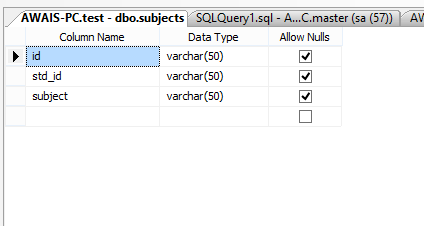
subjects-table-design"
Suppose we have two tables, students and subjects. The student's table contains two fields id and name. The subjects table contains three fields: id, std_id, and subject.
students-table-design
When executed, we need a query to produce the result set with columns describing how many courses each student is taking. In a better version of the result set, we will have a student id, student name, and several subjects.
"


Table structures are also given above for reference.
Everybody knew that we would need to do a count on the subject field of the subjects table. So we wrote a couple of queries, poked some jokes at each other, and ultimately achieved the desired result.
Unfortunately, I couldn't save various versions of the query as it evolved.


Aweas also keyed in dummy data rows. Below is a screenshot of student table data and subjects table data.

select-top-students

select-top-subjects

Next, it occurred to us that we will need to use SQL Group By in this situation. The possibility of using a join was ruled out quickly, and finally, the SQL where clause was also needed.
The final SQL query was made even more beautiful by adding an ORDER BY clause. The result of our quick teamwork is the SQL Query given below.

SELECT students.id AS StudentID, students.name AS Students, COUNT(subjects.subject) AS NoOfSubjects
FROM subjects, students WHERE subjects.std_id=students.id GROUP BY students.name, students.id
ORDER BY StudentID

There are small emotional holes that we leave unplugged due to laziness. We could have left the query unsolved and kept thinking about it for a long time. Some of us would even feel guilty that we could not sort it out. This event shows the importance of teamwork and how a cooperative thought process can help us to solve puzzling questions and crack jokes.

Thursday, February 6, 2014

GROUP BY Date Time, Day, Month, Year, calculate SUM function in SQLite for app developers


SELECT strftime('%m', trxDateTime) as valMonth, 
SUM(trxAmount) as valTotalMonth 
FROM trx_log 
WHERE strftime('%Y', trxDateTime)='2014' GROUP BY valMonth

Given above is the query, which will be explained in the blog below; continue reading for further details.

SQLite GROUP BY Day, Month, Year and sum query example

I have a database table that contains a few fields like transaction date, which is a string representing date time, transaction amount, and transaction status in an SQLite database present on an Android device. The SQL Lite database contains a table named "trx_log" The table has fields _id int, trxDateTime text, trxTargetNumber text, trxAmount number, and trxStatus text. A graphical representation of the table structure is given below:

sqlite-android-search-by-year-group-by-month

SQLite Table used in the example of GROUP BY date, time, month, year, and SUM function.

SQLite Query Sum and Group By Year

How to calculate the sum of all transactions that took place in 2014? What is the SQLite query for the group by results by year and calculating a sum? We will combine SQLite aggregate function SUM with GROUP BY Clause.

SELECT strftime('%Y', trxDateTime) as valYear, SUM(trxAmount) 
FROM trx_log WHERE valYear = '2014' GROUP BY valYear