Showing posts with label UDP. Show all posts

Monday, June 20, 2022

How to Copy data from PowerShell Command-line to Clipboard Tutorial

Udemy Course: Playwright TypeScript Automation Testing

I discovered that we can copy the results of a PowerShell command directly to the Windows Clipboard. This tutorial post shows how to use the pipe operator for this purpose.

PowerShell Pipes and Plumbing


How to copy data from ipconfig to clipboard PowerShell command

ipconfig /all | clip
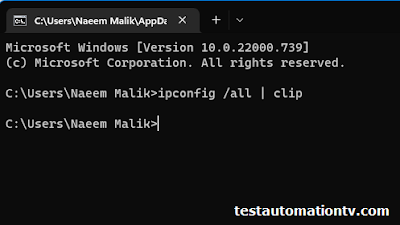
Copy from PowerShell ipconfig to clipboard Tutorial

PowerShell borrowed the pipe symbol from Unix. The Unix pipe symbol (|) is one of the most elegant innovations in computing history. Introduced by Douglas McIlroy at Bell Labs in 1973, it allows programs to chain together by directly feeding the output of one command into another. The simple vertical bar character was chosen for its visual suggestion of a pipeline carrying data.

The pipe revolutionized the Unix philosophy of creating small, focused tools that could be connected together - exemplified by classic combinations like `cat file.txt | grep "pattern"` or `ps aux | grep firefox`. Rather than building monolithic programs that try to do everything, developers created specialized utilities that worked together through pipes.

You can use the pipe with copy command and many more. The pipe helps you chain and automate your workflows. 

Would you like me to give more specific examples of how pipes are used in practice?

The pipe-sign will pipe the output of the ipconfig command over to the clipboard, from where you can paste it into any text editor you choose, such as Notepad, Notepad++, or VS Code.

How to copy present working directory console output to the clipboard using Windows PowerShell

You can use this technique in combination with various commands, including the PWD(Present Working Directory) command i.e.

pwd | clip
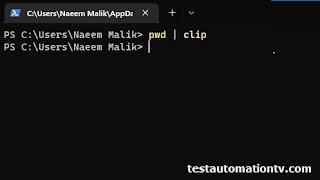
Copy present working directory to clipboard from PowerShell commandline


If you want to copy some random text over to the clipboard, it is also possible.

How to copy random text to clipboard using PowerShell

echo "Copy this" | clip

Copy any text co clipboard from cmd or Windows PowerShell


How to clear Windows Clipboard from PowerShell command

If you want to clear the clipboard, you can pass an empty string through the echo using the following syntax:

echo "" | clip

Clear clipboard Windows Powershell Commandline command


Another PowerShell command to clear the clip is also given below: 

echo $null | clip


You may also use the PowerShell method Get-Clipboard and Set-Clipboard in some scenarios, although I need to figure out the specific scenarios.

Sometimes, you may use the stream redirection operation for the same purpose. 

I hope you'll find this tech tip blog post useful. Feel free to share if you, too, know anything cool.

And just an "oh, by the way," I also learned about the Get-Content command today, which can be used to print the contents of a text file to the console. It has got some other sophisticated uses too. But the simplest one I've found so far is a replacement of the Linux cat command(also available in PowerShell). 


How to copy the contents of a file without opening it on Windows using PowerShell

Suppose you're on a Windows machine and want to copy the contents of a text file without opening it. Is it possible? Let me show you how to copy the contents of a file to the Windows clipboard using PowerShell.

First of all, you can use the following command to read the contents of a file:
cat

The cat command comes from Linux, widely used in the Linux world to print the contents of a file.

PowerShell Cat Command copy to clipboard

The above image shows how you can print the contents of a file on the screen using PowerShell.

Quick Tip:

If the folder is opened in Windows File Explorer, click on the path textbox and enter the word.  


PowerShell to launch PowerShell in the same folder.


You can easily pipe the results of the cat command over to the clip object representing Windows Clipboard. An example is shown below:

cat .\Login.java | clip


cat text contents of file to clip powershell command windows


All in all, I showed you the following three commands in this short blog post: 


ipconfig /all | clip

pwd | clip

echo "" | clip

cat <file-name> | clip

The difference between Windows Pipe and Unix Pipe

Although the Windows pipe and the Unix pipe look similar, they are very different under the hood. Unlike Unix pipes that simply pass text streams, PowerShell pipes pass entire objects between commands, which makes them more powerful for certain tasks. For example, you can access properties of objects directly in the pipeline, like $_.Length or $_.Status.

More practical PowerShell commands using pipe are listed below FYI. 

# Get all running processes and sort them by memory usage

Get-Process | Sort-Object -Property WS -Descending


# Find specific services and display as a table

Get-Service | Where-Object {$_.Status -eq "Running"} | Format-Table -AutoSize


# List files, filter by size, export to CSV

Get-ChildItem | Where-Object {$_.Length -gt 100MB} | Export-Csv -Path "large-files.csv"


# Get stopped services and attempt to start them

Get-Service | Where-Object {$_.Status -eq "Stopped"} | Start-Service


# Find large log files older than 30 days

Get-ChildItem -Path "C:\Logs" -Filter *.log | 

    Where-Object {$_.LastWriteTime -lt (Get-Date).AddDays(-30)} |

    Where-Object {$_.Length -gt 1MB}

Sunday, May 19, 2019

UDP Socket Programming For Distributed Computing in C#.Net


This course teaches UDP socket programming in C# .Net in a hands on and easy fashion. It is a carefully planned and crafted course which takes the student by the hand and teaches them how to create production quality distributed network applications using C# .Net in a step by step fashion.

The first sections of this course cover the basics of computer networks, and UDP socket programming in CSharp dot Net necessary for network and socket programming.
Next two sections will teach how to send and receive UDP broadcast in a command prompt C# .Net application using synchronous sockets with method calls such as Socket.Send and Socket.Receive. You will also learn how to convert between string and byte data types.

Once you're familiar with how distributed network applications function, the course takes you towards asynchronous socket programming. You will also learn about callbacks methods and how you can implement callbacks in C# .Net. I will also show you the publisher subscriber model AKA pub/sub model. We will implement pub/sub model in our library project and the client/server applications using the library as well. We'll create event handlers, delegates, and raise events as well.

We are going to use an Object Oriented approach for this course following the principles of OOP. In next section we're going to implement a publisher/subscriber model in C# .Net to bridge the gap between the API solution classes and the WinForms based front end.

Next, you will learn what is JSON (JavaScript Object Notation) and how you can add JSON functionality to your C# applications with Newtonsoft JSON.Net. We'll start implementing an application level communication protocol in this section.
In the next section, you'll learn how to transmit binary data over a UDP socket in C# .Net. As an example, I'm going to show you how to transfer png image files between multiple clients of your applications through the server. The JSON based protocol implemented in previous section is going to play a key role here.

After watching this course, you'll be able to write your own distributed applications that communicate through the network, either WiFi or Ethernet. You will have the foundation knowledge needed to create C# .Net based applications for IoT, computer telephony, VoIP, online gaming(e.g. Unity), and much more.

This course also shows you how to use String Interpolation which is a C# 6 feature. You'll also learn how to debug network applications in Visual Studio and how to write code faster.

Discounted coupon code link for the UDP socket programming in C# .Net course. 

You don't need to learn C to work on this course.

Socket Java, python socket udp

Sunday, January 20, 2019

Key characteristics of UDP and comparison to TCP/IP

Let’s talk about UDP and compare it to TCP/IP, another populer internet communication protocol..
The synonym UDP stands for User Datagram Protocol.


UDP Socket Programming in C# Discount
Learn UDP Socket Programming By Example


It is a connection-less IP data transfer protocol.

But… what is connectionless?

Lemme explain, in a connectionless protocol the sender and the receiver don’t need to establish a connection before they could start a data transfer.
For example if you want to talk to a stranger in real life, you’ll need to shake hands and introduce yourself before starting the conversation.
This is the way TCP/IP protocol works.


If you and the stranger were computers communicating through UDP, you won’t need to shake hands and have an introduction. You can just start talking.
The heart of user datagram protocol is “the datagram”
It is the basic unit of data transfer in UDP
A UDP datagram contains information about the IP address & port number of the host machine which is supposed to receive it, and a payload which has to be delivered.
Everything is in binary format and… represented by bytes.
A datagram is sent by a host computer as one unit and it is received by the target computer as one unit.
A good example will be like putting a letter in an envelope
 writing an address and port number as well on the envelope
Giving it to the postal service so that the intended receiver would pick it up.
An envelope here is the datagram.
Now let’s talk about a unique capability of UDP, that is … Datagram Broadcasting....
Since UDP is a connectionless protocol, as I explained earlier.
No hand shakes are needed
A host can send a packet to all hosts in the network on a specific port number at once in broadcast mode.
This would be akin to picking up a megaphone and talking to everybody in a hall at once.
In case of broadcast, The IP address part of the datagram is set to all 1s and a port number is also supplied
Any other host in the same local area network listening on the specific port number can receive this packet.


We can say it will be akin to putting a letter in an envelope and writing the address “everybody ” on it.
UDP broadcast is a feature used by many network protocols such as Simple Network Monitoring Protocol or SNMP.
I must tell you about some other important details of UDP protocol as well.
First, the delivery of a datagram is not guaranteed in UDP.
This means that if a packet is not received on the client, the network will not be flooded with re-transmission packets.
That’s why UDP is used for applications like video and audio conferencing, and IP TV.
A few missed packets will cause a some squeaks in the voice or maybe a few distorted pictures.
But the network won’t be congested with additional packets just to make sure you don’t miss a frame while binging on Netflix.
This is different from TCP/IP, in which case there’s an elaborate system of acknowledgements and retransmissions to make sure that all data sent is delivered successfully.
Secondly, the sequence of arrival of datagrams on the receiver can be different from the sequence of sending.
Both of these characteristics make UDP a faster protocol as compared to the TCP/IP.
Anyhow, both TCP/IP and UDP have their own areas of application.
Their own strengths and weaknesses.
And one size doesn't fit all in this case.
Since we’re already talking about TCP/IP protocol. It is worth mentioning that in case of TCP/IP protocol the sender and receiver must establish a connection before they could start a data exchange.
TCP/IP can’t do broadcasting and multicasting.

UDP Socket Programming in C# Discount
Learn UDP Socket Programming By Example


Multicasting happens when a sender can send one datagram to multiple well known hosts, this is useful in IPTV scenarios.
Now that you got the basics covered about network programming. Let’s move on to the next section where we’d crank some code.
You don't need to learn C to work on this course.

Socket Java, python socket udp