Showing posts with label Sockets. Show all posts

Wednesday, April 26, 2023

TCP Socket Programming on Windows in C# Tutorial

Socket Programming Computer Network TCP/IP Tutorial Udemy Course


Udemy Course: Playwright TypeScript Automation Testing

The Microsoft .NET Framework's (now dotnet) Socket class can program TCP/IP sockets in C# on Windows. The Socket class provides methods and attributes for creating, connecting, sending, and receiving data through TCP/IP sockets.

Discount coupon for my TCP/IP socket programming course:

https://www.udemy.com/course/tcpip-socket-programming-for-coders-using-csharp-net/?couponCode=CHATGPT_TCP_SOCKETS

In C#, here's a simple example of how to create a client that connects to a server over TCP/IP sockets:


using System;

using System.Net;

using System.Net.Sockets;

using System.Text;


class Program {

  static void Main(string[] args) {

    // Establish the remote endpoint for the socket.

    IPHostEntry ipHostInfo = Dns.GetHostEntry("localhost");

    IPAddress ipAddress = ipHostInfo.AddressList[0];

    IPEndPoint remoteEndPoint = new IPEndPoint(ipAddress, 11000);


    // Create a TCP/IP socket.

    Socket client = new Socket(ipAddress.AddressFamily, SocketType.Stream, ProtocolType.Tcp);


    // Connect to the remote endpoint.

    client.Connect(remoteEndPoint);

    Console.WriteLine("Socket connected to {0}", client.RemoteEndPoint.ToString());

    // Encode the data string into a byte array.

    byte[] data = Encoding.ASCII.GetBytes("Hello, server!");


    // Send the data through the socket.

    int bytesSent = client.Send(data);


    // Receive the response from the server.

    byte[] buffer = new byte[1024];

    int bytesRec = client.Receive(buffer);

    Console.WriteLine("Server response: {0}", Encoding.ASCII.GetString(buffer, 0, bytesRec));


    // Release the socket.

    client.Shutdown(SocketShutdown.Both);

    client.Close();

  }

}

This example implements a TCP/IP client that connects to a server operating on the same computer (localhost) on port 11000. The client sends the server a "Hello, server!" message and receives a return message.

You can use the following code to construct a TCP/IP server:


using System;
using System.Net;
using System.Net.Sockets;
using System.Text;

class Program {
  static void Main(string[] args) {
    // Establish the local endpoint for the socket.
    IPHostEntry ipHostInfo = Dns.GetHostEntry("localhost");
    IPAddress ipAddress = ipHostInfo.AddressList[0];
    IPEndPoint localEndPoint = new IPEndPoint(ipAddress, 11000);

    // Create a TCP/IP socket.
    Socket listener = new Socket(ipAddress.AddressFamily, SocketType.Stream, ProtocolType.Tcp);

    // Bind the socket to the local endpoint and listen for incoming connections.
    listener.Bind(localEndPoint);
    listener.Listen(10);

    Console.WriteLine("Waiting for a connection...");

    // Accept incoming connections and start a new socket to handle communication with the client.
    Socket handler = listener.Accept();
    Console.WriteLine("Connection established with {0}", handler.RemoteEndPoint.ToString());

    // Receive data from the client and send a response.
    byte[] buffer = new byte[1024];
    int bytesRec = handler.Receive(buffer);
    Console.WriteLine("Client message: {0}", Encoding.ASCII.GetString(buffer, 0, bytesRec));

    byte[] response = Encoding.ASCII.GetBytes("Hello, client!");
    handler.Send(response);

    // Release the socket.
    handler.Shutdown(SocketShutdown.Both);
    handler.Close();
  }
}

This example how-to tutorial establishes a TCP/IP server that waits for incoming connections on port 11000. When a client joins, the server accepts the connection and opens a new socket to handle client communication. The server gets a message from the client and responds with its own message.

Please note that these are relatively basic examples. They don't include error handling or advanced capabilities such as asynchronous socket communication. Correct handling of exceptions and problems is critical when working with them in production.

What is a Socket in Computer Networking

A socket is a software endpoint that creates a communication channel between two computers or processes over a network. Think of it like a phone call: To establish communication, you need both a phone number (IP address) and an extension (port number).

Here's what makes up a socket:

  • IP Address: Identifies the computer/device (like "192.168.1.1")
  • Port Number: Identifies the specific process/application (like 80 for HTTP)
  • Protocol: Usually TCP (reliable) or UDP (faster but less reliable)

Types of Sockets:

  1. Stream Sockets (SOCK_STREAM)
    • Uses TCP
    • Reliable, ordered delivery
    • Like a phone conversation
  2. Datagram Sockets (SOCK_DGRAM)[not covered in this tutorial]
    • Uses UDP
    • Faster but unreliable
    • Like sending postcards

Common Network Socket Operations:

  • bind(): Associates the socket with a specific address and port
  • listen(): Waits for incoming connections
  • accept(): Accepts a connection from a client
  • connect(): Establishes a connection to a server
  • send()/recieve(): Sends or receives data
  • close(): Closes the socket

TCP/IP (Transmission Control Protocol/Internet Protocol) and socket programming are fundamental concepts in network communication.

TCP/IP:

  • It's a suite of protocols that powers the internet and most local networks
  • Works in layers:
    • Application Layer (HTTP, FTP, SMTP)
    • Transport Layer (TCP, UDP)
    • Internet Layer (IP)
    • Network Access Layer

Key features of TCP/IP:

  • Connection-oriented (TCP ensures reliable delivery)
  • Packet-based transmission
  • Error checking and recovery
  • Flow control
  • Addressing using IP addresses and ports

Socket Programming: This is the programming interface to create network applications. Think of a socket as a combination of:

  • IP address (where to find the computer)
  • Port number (which program on that computer)
  • Protocol (TCP or UDP

Common Socket Programming Use Cases:

  • Web servers
  • Chat applications
  • Game networking
  • File transfer
  • Remote procedure calls
  • Database connections

Monday, May 20, 2019

Online Course Introduction: TCP/IP Socket Programming in C#.Net For Coders & Students


Learn socket programming in C# .Net
Big discount coupon link
https://www.udemy.com/tcpip-socket-programming-for-coders-using-csharp-net/?couponCode=HALF
Get proficient in computer network socket programming using TCP/IP streaming sockets and become a better professional programmer.


An important concept of socket programming & network communication is covered in every video lecture. Concise C# code examples are supplied in Visual Studio solution form, and a demo after every couple of lectures will show you practical implementation of the concepts described earlier. 
          By the end of this course, you will be able to create CSharp .Net software capable of sending and receiving data over TCP/IP sockets on peer to peer basis with async and await keywords. You will learn not only socket programming, but async/await keywords as well. The course will make you a better programmer.

Why take this course? 
You should take this course if you're a professional(or student) with some coding experience in the past but lack understanding of how computer networks work on a software level(either in C#, Java, or C++). 
You will learn techniques which are useful in real life scenarios commonly faced by programmers. 
Many students of distributed application programming university courses have taken this course in the past and posted positive comments in reviews. They were able to easily complete their assignments on their own after watching this course.                        
Section 1 is available for free, it contains very useful information anybody can benefit from, whether they're familiar with C#.Net or not. 


Minimum upfront theory 
A lot of courses tend to pile up theory ahead of the real code, this course is going take a minimum theory first approach. 
You will learn essentials of network programming and start writing C# code in under 15 minutes. 

Use of Windows Forms and class library
This course will use a class library project in C# along with Win Forms, an approach different from many other courses who use command line projects. My teaching methodology makes the course lot less boring and non-classroom like, practically useful and really suitable for professionals. 
Short, sweet, to the point 
Entire course is designed with the busy professionals in mind and the videos were created to make your online learning experience fruitful and easy.  It is a project based training.
Asynchronous programming with async/await keywords, modern real world solution
async/await keywords were introduced in C# 5.0. In traditional socket programming scenarios, (multi) threading is use to create a responsive server or client. I have bypassed that route and shown you how to use asynchronous sockets directly. I first explain you what are async/await keywords and then I show how to use these for non-blocking network I/O. This part of the puzzle in the key to high traffic enterprise applications.
Reinforced learning 
Each section contains a quiz on the end which is very helpful to ensure that you review and retain important bits of information imparted in relevant course section.
Join an active community
Become a part of the programmers community who have already taken this course. Your questions will be answered by the fellow students and the course instructor as well. Really a wonderful place to start learning!
Learn something new
Sockets are considered an advanced topic, a danger zone in programming parlance. Knowing it means you take your trade seriously.
Object Oriented Programming
This course teaches you how to create a distributed application using the principles of OOP. You are going to bridge the gap between the back-end C#.Net class library and the fron-tend WinForms application using an implementation of Publisher/Subscriber model based on EventHandler classes. This course also shows you what are event handlers and how to create your own event.
Bonus 
You will also learn how to resolve a hostname to IP Address using System.Net.DNS class. You'll also implement various sanity checks using tryparse and try/catch. 
https://www.udemy.com/tcpip-socket-programming-for-coders-using-csharp-net/?couponCode=HALF

You don't need to learn C to work on this course.

Socket Java, python socket udp

Sunday, May 19, 2019

UDP Socket Programming For Distributed Computing in C#.Net


This course teaches UDP socket programming in C# .Net in a hands on and easy fashion. It is a carefully planned and crafted course which takes the student by the hand and teaches them how to create production quality distributed network applications using C# .Net in a step by step fashion.

The first sections of this course cover the basics of computer networks, and UDP socket programming in CSharp dot Net necessary for network and socket programming.
Next two sections will teach how to send and receive UDP broadcast in a command prompt C# .Net application using synchronous sockets with method calls such as Socket.Send and Socket.Receive. You will also learn how to convert between string and byte data types.

Once you're familiar with how distributed network applications function, the course takes you towards asynchronous socket programming. You will also learn about callbacks methods and how you can implement callbacks in C# .Net. I will also show you the publisher subscriber model AKA pub/sub model. We will implement pub/sub model in our library project and the client/server applications using the library as well. We'll create event handlers, delegates, and raise events as well.

We are going to use an Object Oriented approach for this course following the principles of OOP. In next section we're going to implement a publisher/subscriber model in C# .Net to bridge the gap between the API solution classes and the WinForms based front end.

Next, you will learn what is JSON (JavaScript Object Notation) and how you can add JSON functionality to your C# applications with Newtonsoft JSON.Net. We'll start implementing an application level communication protocol in this section.
In the next section, you'll learn how to transmit binary data over a UDP socket in C# .Net. As an example, I'm going to show you how to transfer png image files between multiple clients of your applications through the server. The JSON based protocol implemented in previous section is going to play a key role here.

After watching this course, you'll be able to write your own distributed applications that communicate through the network, either WiFi or Ethernet. You will have the foundation knowledge needed to create C# .Net based applications for IoT, computer telephony, VoIP, online gaming(e.g. Unity), and much more.

This course also shows you how to use String Interpolation which is a C# 6 feature. You'll also learn how to debug network applications in Visual Studio and how to write code faster.

Discounted coupon code link for the UDP socket programming in C# .Net course. 

You don't need to learn C to work on this course.

Socket Java, python socket udp

Monday, February 4, 2019

What is socket programming?


Socket programming is, first of all, a means of boosting ego among the geeks and nerds who know it.
There are two types of programmers, one who has done socket programming and one who has not.

You may learn socket through the discounted links below; I teach two courses about socket programming on Udemy.

https://www.udemy.com/tcpip-socket-programming-for-coders-using-csharp-net/?couponCode=HALF

https://www.udemy.com/course/udpsocketprogramming/?referralCode=9A39D0BAEBF79DBDE6A3


Aside from this difference, the term "socket" is referred to a software-level construct that can be used to access a computer network. The term "access" encompasses two things:

  1. A computer reading data from the network sent by another computer
  2. A computer writes data to the network to send it to another computer

It appears simple when we send a message over a computer network using an app like Whatsapp. But there's a lot of complexity going on underneath it. Even the programmers must be shielded from the radiation of things like the OSI model and BGP. That's where sockets come in. Let me give you the simple definition of a socket.

Socket: 
A socket is a variable you can create in a high-level programming level, such as C#, Java, or C++. Once you have the socket, you can send and receive data using the computer network.
A socket is like an abstraction. It hides a lot of complexity under it and lets the coders write code that results in transmitting their data through WiFi, Ethernet, or any other means.
Sockets are often exposed through various APIs.

A few examples of socket APIs are given below, along with their mother languages.

  1. Java - java.net.*
  2. C# - System.Net.*
  3. C++ - socket.h

Windows provides an implementation of sockets through WinSock2 API. This is, in turn, used by runtimes like JVM(Java Virtual Machine) and .Net CLR(Common Language Runtime).
You don't need to learn C to work on this course.


Thursday, January 24, 2019

Host, IP Address, and Port Number In Computer Networking, Socket Programing, and Distributed Applications

Host Computer Network Socket Programming
Example of A Host In A Computer Network


Host

We must have a sound understanding of a few networking concepts before we start writing a network application’s code. We’ll start with the term Host.

More than 65% discount on network & socket programming courses:


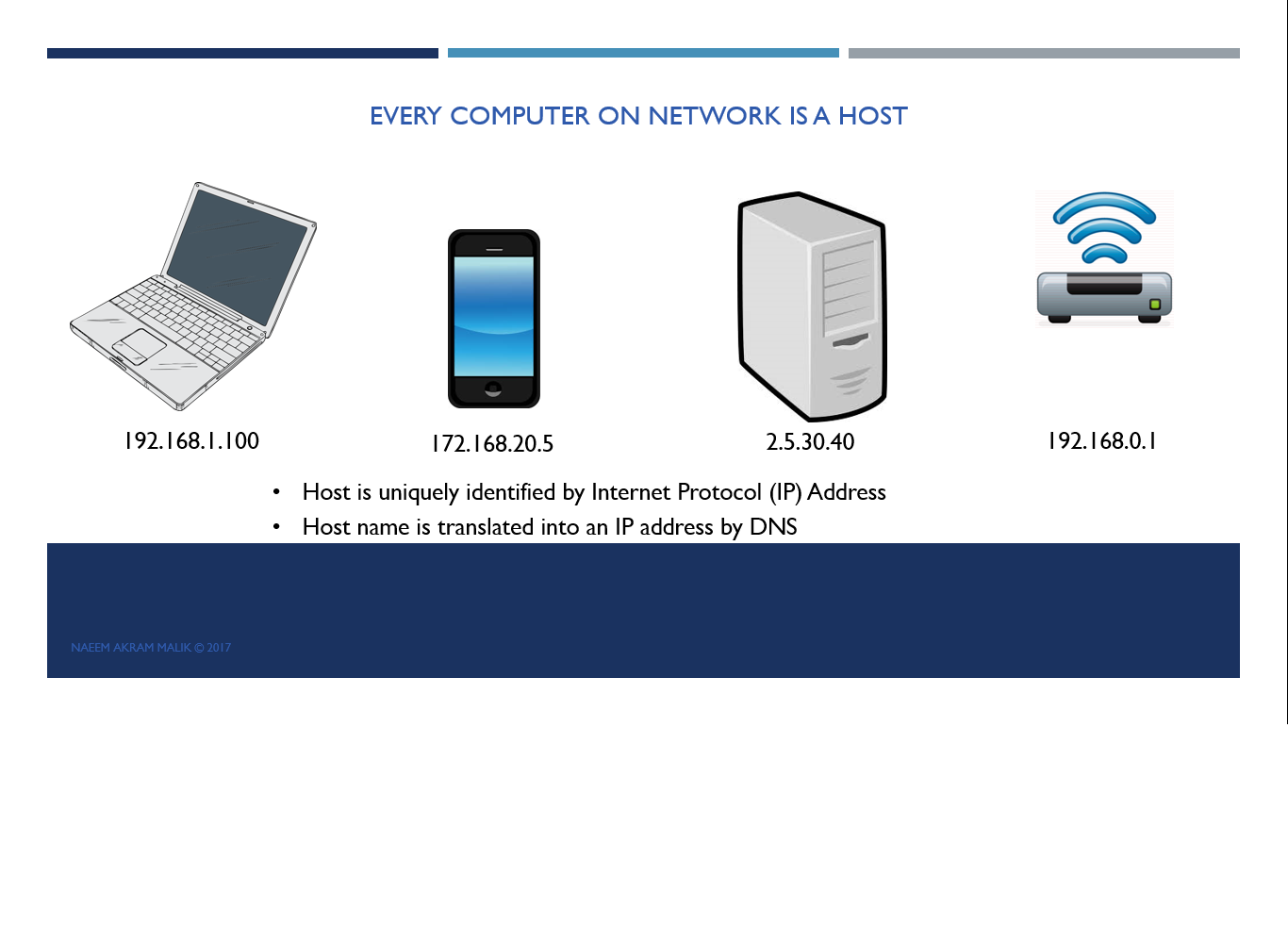
A host is a fancy term for any computing device connected to a computer network.
This machine can be a laptop, a smartphone, your home router, Amazon Alexa, or a server running in the cloud.
A machine is called a host for a reason.
It is called a host because "it is hosting a software which can communicate over the network."

Every host on a network is accessible through a unique address within that network.
This address is called Internet Protocol Address, or IP Address for short.

 A few examples of IP addresses are given below. It is written in dotted decimal notation.
We’ll learn more about the IP address in the next video.

IP Address

In this video, I’ll explain what an IP address is. IP Stands for Internet Protocol.
V is for version.
IP Address UDP and TCP IP Socket Programming IP V4
IP V4 In Computer Networks

At present, IP V4 is the most widespread IP protocol.
Another version of IP specification is IP V6, which is catching up these days.
An IP V4 address is a group of 4 different 8-bit numbers.
The total length of the IP Address is 32 bits.
An individual number inside the IP Address can have a value between 0 and 255
When printing an IP address, the four numbers are separated by a dot to make reading easier.
This method of printing the IP address is called the dotted decimal notation.
In many cases, a hostname is used instead of an IP address.
A hostname gets translated into an IP address by a Domain Name Server, a.k.a DNS.

The Port(Number)


More than 65% discount on network & socket programming courses:
https://www.udemy.com/udpsocketprogramming/?couponCode=HALFPRICE

https://www.udemy.com/tcpip-socket-programming-for-coders-using-csharp-net/?couponCode=HALF

In order to understand port numbers, we will use an analogy.
Let’s consider that your PC is like an apartment building.
This building can be reached through a specific street address.
In the case of a PC, it will be the IP address.
This building is further divided into apartments, where every apartment is identified by a unique apartment number.

Port Computer Networking Socket Programming EndPoint System Ports
This apartment number is similar to the port number.
The computer contains a large but finite number of ports.
Each apartment in this building is occupied by only one thread or process.
Only one thread or process can send or receive data from a port number.
When we need to send data to a specific thread or process, we need to know which port number it is using.
We also need to know the PC's IP address on which the thread or the process is running.
The combination of an IP address and a port number is known as an EndPoint.
A few examples are shown on the screen.
There are total of 65536 ports on a computer.
Port numbers from 0 to 1023 are reserved for operating system usage.
These apartments are occupied by the building administration.
 These are called well-known ports or system ports.
A few examples are port 20 is used for FTP(File Transfer Protocol).
Port 23 for telnet and port 25 for emails using SMTP(Simple Mail Transfer Protocol).
And port 53 for DNS(Domain Name Server).

You don't need to learn C# to work on this course.

Socket Java, python socket udp

More than 65% discount on network & socket programming courses:

Friday, July 10, 2015

Network Programming course offered by AIOU in BCS programme is wonderful

AIOU-BCS-COURSE-OUTLINE-NETWORK-PROGRAMMING-3487
Network Programming 3487 in list of  BCS courses of AIOU 


I am an Allama Iqbal Open University graduate, I passed BCS in 2005. I've been working as a programmer ever since, although I've changed track a few years ago and moved to automated software testing. I must say Open university has got a very good program in place and if someone's got a fire in their belly, AIOU has got the gasoline to turn it into an inferno. It has produced bright stars like my friend & colleague Akhter Sheikh.

AIOU Network Programming course code 3482

You can check the detailed curriculum of the course here

http://www.aiou.edu.pk/CourseDetail.asp?CID=171&PID=187

This course is using Winsock 2 with VC++ which is not commonly used in the market these days. I suppose using C# .Net instead would have been more beneficial for the students, because it is a widely used programming language.


aiou-network-programming-3482-course-details
Course outline of network programming course


Inclusion of advanced topics like IOCP and QoS is a good move, it will help students to get jobs in software development market.


An online video course about TCP/IP socket programming

Network programming course on AIOU website came to my attention one day while I was casually browsing list of courses included in their bachelor of computer sciences program these days.
My online course about TCP/IP socket programming is hosted on Udemy.com and it can be helpful for people who are either taking this course right now or have taken the course some time in past already.
I have created a free discount 100% coupon for my junior university fellows. You don't pay anything, just click the link given below and watch the stuff. I'm sure it will be worth your time.

The first section of the course explains several important computer networking concepts which are used for socket and network programming. These concepts are universal, which means useful for C++/C#/Java/Python or any other programming language.
The remaining parts of the course show practical coding examples and programming techniques which are useful in general.


Join my online course, its FREE!

I recommend you to sign up for my online course and take a peek, it is totally free(using the link below) and you will get a wealth of information in two hours. Just click the link below!


Udemy Discount Online Learning Course Socket Programming

Asynchronous Socket Programming in C#


Prologue: How I got into network programming?

Before I became automated software testing professional, I luckily had a chance to do network programming in more than one language. I started in C# .Net for a telephony server application that used TCP/IP sockets to share data between a Panasonic POTS PBX (Microsoft TAPI 2.1) and various clients. Later on, I used Winsock in a C++ based project. I even used POSIX sockets for a short project while working with an Alcatel Lucent IP PBX(CSTA).

I had no idea back then that in the years to come I will be using sockets again and again. I used UDP sockets in Java programming language for an Android remote control app(iSymphony 2.1), that was some time in 2012/2013. User data gram sockets are considerably different as compared to connection based TCP/IP sockets.
You don't need to learn C to work on this course.

Socket Java, python socket udp

Friday, November 14, 2014

Interview Questions on Socket Programming

Socket programming is used to make computers exchange data. It is an uncommon topic and not many programmers come across it in their professional career.
This blog post outlines several questions which might be asked from someone in an interview for a position that involves either writing code for network applications or managing a team of people writing network programming code.

The questions listed here are worth reading and knowing the answers to these questions in general means you have a sound top level understanding of computer networks work.

It is possible to learn network programming in only one hour, just take the Udemy course given below,

https://www.udemy.com/tcpip-socket-programming-for-coders-using-csharp-net/#/

1. A host is a machine that is hosting a software capable of communicating over the network. Yes/No?
2. A host is identified by an IP Address which is unique inside a network. Yes/No?
3. In enterprise scenarios, a host name is translated into an IP address by a server called:

  1. DHCP Server
  2. DNS
  3. LDAP Server
4. An IPV 4 IP address is a group of __???__ numbers, each 8 bit in size with a value between 0 to 255.


Demo TCP/IP Sockets Read and Write in C#, Free #Udemy Course, 100% discount from Naeem Akram on Vimeo.

5. We find the IP Address of our computer using a DOS command which is

  1. tracert
  2. ipconfig /all
  3. ipconfig /flushdns
Quick TCP/IP Socket programming for coders is a free course (limited time offer), take the course and learn about socket programming in only one hour.

https://www.udemy.com/tcpip-socket-programming-for-coders-using-csharp-net/#/

6. Every computer contains a finite number of ports which is

  1. 1024
  2. 65536
  3. 99999


7. The client process and the server process must be running on two different machines.
8. A pair of an IP address and a port number is used by the server process to listen for incoming connection requests, this pair is called an __???__

9. A client processes's attempt to connect with a server process can fail for various reasons including


  1. Windows firewall has blocked the client process or server process from using the network.
  2. Server IP address supplied to the client is wrong
  3. The server process is not started at all
  4. All of above


10. Telnet is a free utility, it is always enabled on every PC. Yes/No?
11. We will enable Telnet __???__ from the "Add Remove Programs" dialog "Turn Windows features on or off"

https://www.udemy.com/tcpip-socket-programming-for-coders-using-csharp-net/#/
Only one hour is all you need to know answers of the questions listed here and get loads of more interesting information about computer networks. The course link given above is free for a limited time, it won't cost you anything and you will learn loads of new stuff so just go ahead and sign-up.

Thursday, November 13, 2014

Learn TCP/IP Socket Programming in 1 hour


Demo TCP/IP Sockets Read and Write in C#, Free Udemy Course from Naeem Akram on Vimeo.

Network programming is a very important topic, it is also considered a bit complicated. Most of the tutorials and lessons already available on the internet tend to make this topic even difficult to learn.
This Udemy.com based online course is totally free for first month, and it makes socket programming using C# really easy.

By taking this free Udemy course, you will be ready to write network communication applications within only one hour!

You will learn a lot of other useful things during this course, for example how to find the IP address of your PC using command prompt and how to use telnet utility.
More techniques such as finding an IP address through a host address and selecting the active IPV4 address of your PC automatically will also be covered in this course soon.
I will also add videos about how to handle multiple client nodes and how to add/remove clients from the list of connected ones as well.

I've uploaded same demo video to Youtube as well.


Please join this course, watch it, and provide your highly valued feedback. It will be very helpful for me.

The author is a professional computer programmer with socket and network programming experience in C++ and C# languages on Windows platform, and same in Java language on Android platform as well.

The author loves to blog, which is evident by the posts in this blog which have been written over the course of six years(on time of this writing). On the side, this author has got a very nice kitchen garden on the roof top and loves to cook delicious Pakistani food as well. Most importantly, I'm a proud and loving father of two children as well :)

So please join this course about TCP/IP socket programming using C#.Net. I am sure it will be helpful and you will learn a lot of very useful programming techniques and some really cool theory.