Saturday, January 22, 2011

Turn On or Off A Windows Computer's Display With SendMessage User32.dll Win32API Call In C++ or C#

How Can I Turn Off My Laptop's Display Whenever I Want?
Update: I have moved the .exe download from 4Shared to my own domain (http://www.ldapfilters.com), therefore the download is a one step process now.
Update (2026): I revisited this whole topic for 2026 — turns out you no longer need to compile anything or download an .exe at all. PowerShell can do the exact same thing in one line, built into every Windows PC. Read the rewrite here: Turn Off Your Windows Display With One Line of PowerShell (2026 Update).
I recently felt the need to turn off my laptop's monitor on my will, but you know there ain't such a button on almost all laptops. (Not interested in tech stuff? scroll down directly to Download, and get the executeable) So I tried to search around the internet for some utility, sadly speaking I didn't find any such thing. But you know I'm a programmer after all, therefore instead of searching a trust-worthy utility, I sought a do it yourself code example. I found the example here on code project: http://www.codeproject.com/KB/system/display_states.aspx The code needed to turn your monitor off/on is literally a one liner. All you need is one line, and your monitor will be powered off as soon as you run the .exe file. Here's the code friends:
 #include <Windows.h>
int main(int argc, char* argv[]) {         
SendMessage(HWND_BROADCAST, WM_SYSCOMMAND, SC_MONITORPOWER,           (LPARAM) 2);// this c++ code will turn the monitor off
return 0;
}


You will be wondering, how the monitor/display will be turned back on?


The good news is Windows handles that part automatically. Whenever we turn off display with this cut throat application of ours, moving mouse or pressing a key will bring the monitor back to life. Although broadcasting another message will fire the display up, but we don't need that I think. Still, here's the code:
SendMessage(HWND_BROADCAST, WM_SYSCOMMAND, SC_MONITORPOWER, (LPARAM) 1); Take this piece of code to any C++ IDE of your choice(of course Windows duffer!!!), just compile build and your very own application to turn off the monitor will be ready. Place the executable anywhere you want, create a shortcut on desktop, whenever you'll click it the monitor will go dark. And if you don't wanna do that, just download the ready to run executable of this cut throat advanced bleeding edge top class wonderful awesome @#%$#%&~!^&%$#@+ app that can shut down your PC or Laptop's display/monitor whenever you want here !!!
(2026 note: this download link is over a decade old at this point and I can no longer personally vouch for what's on the other end of it. The 2026 PowerShell rewrite gets you the identical result with one built-in command — nothing to download, compile, or trust.)

Instructions:
  1. Just place the .exe file anywhere in your system, double clicking it will turn off the monitor you may create a shortcut on desktop, or pin it to task bar for easy access (details below).
  2. Moving the mouse, or pressing a key on keyboard will turn your system's display back on.
Please keep that in mind:
  • This utility does not open any network communications port
  • This utility does not read/write any kind of files to/from your computer's hard disk
  • This utility does not read/write anything to/from Windows Registry.
Therefore, if the file you download tries to do any of the above, the file is not original and someone has tampered with it. Making Things Even Better (Value Addition): There's a very cool Windows 7 feature which I've used to make things even better on my laptop. The feature goes like you can access the shortcuts pinned to Windows by pressing Windows Button + a number. The leftmost minimized program or pinned shortcut will be activated by pressing Windows + 1, second left with Windows + 2, so on and so forth. For example see the snap shot of my current Windows Toolbar
desktop_snapshot_Turn_Off_Display_Monitor
The yellow numbers aren't found originally in the interface, I've annotated the snap shot on purpose. Right now, if I will press Windows Key and then press 2 key(not from num-pad) the Windows Media player which is second from left will be maximized. Similarly, Windows 5 will cause Google Chrome to open up. Windows 8 will maximize Ms Paint. I have pinned the .exe file of our cut throat power off display application to Task bar. Therefore, if I will press Windows key + 1 display of my laptop will be turned off. Technical Explanation: How Windows Works Basically we need to understand the architecture of Windows applications to get the core of what's happening in this single line of code. In a Windows environment, we don't interact with any application directly. Instead whenever we perform an action we are talking to Windows Operating System, the OS takes our command/action and passes it over to an application depending on the location of the action/command/event.  For Example: Like if you click in a Ms Word window, following will happen:
  1. Windows OS will catch the message 
  2. It will see that currently the window associated with Ms Word was active
  3. It will pass over your command in form of a message to Ms Word
  4. Each and every Windows based application contains a "Windows Message Message Pump" loop, which keeps watching for incoming messages from Windows OS
  5. In this case, the message pump inside Ms Word will catch the message that "user clicked somewhere".
  6. Then Ms Word will handle the message what ever way it wants to.
  7. If an application has not handled a certain message, the message will simply have no affect on its health and the application will just discard the message.
People writing code for .Net platform (usually) don't know these things, but that's the basic Ms Windows architecture, and its not going anywhere any time soon. The "Windows Message Pump" plus WndProc method is alway in there. Where does SendMessage() fit in? SendMessage is found in User32.dll, and its a Win32 API call(scary bare bone stuff for .Netters). In this program we are broadcasting a message, which is not intended for any specific application. Like the fishermen broadcast help requests on radio. We are just saying "Hey anybody out there, I am sending  a WM_SYSCOMMAND which is related to SC_MONITORPOWER with a value of 2". Luckily there is a portion of Windows which is handling this message, its the same part which turns your display off after a certain amount of time. This function call won't affect anything else on your system, cause no other application is consuming this message. So, in the end, your display is powered off so that you can sit back and relax ;)

You might have noticed that I just provided C++ source code, and there ain't not C# .Net code as sample. I think its quite easy to setup p/Invoke calls these days, I am intentionally avoiding the topic as I want to keep the article short and to the point. Just if you've understood the scheme of things, you can easily setup a C#.Net or VB.Net version. (Update 2026: I finally went and wrote that version — except in PowerShell rather than C#/VB.Net, using the Add-Type cmdlet to make the same P/Invoke call without a separate compile step. See the 2026 rewrite of this post for the one-liner, plus a section on what else PowerShell can do to a Windows system.)

DISCLAIMER: There is no guarantee or warantee that this program will work as specified in this post. Author will not be responsible for any damage due to use of instructions provided in this post.


Saturday, September 25, 2010

Char** Array of Strings in C and C Plus Plus(C++)


The C++ source code  shown below is an example of char**, also known as a character double pointer, which is used for managing two-dimensional arrays of string variables.
Keep reading to learn more & see detailed examples.


char** greenLandMD;
greenLandMD = new char*[5];// initialize the double pointer
greenLandMD[0]=new char[4];// initialize 1st char*, with capacity of 4 chars
greenLandMD[1]=new char[5];// initialize 2nd char*, with capacity of 5 chars
    
strcpy(greenLandMD[0],"Bst @");//copy some data to 1st string
strcpy(greenLandMD[1],"Bi! 1");//copy some data to 2nd string
greenLandMD[3]="W ared";// an alternate way of copying data
 
// print and see the data
cout<<greenLandMD[0]<<endl<<greenLandMD[1]<<endl<<greenLandMD[3]<<endl;


Char** Strings Array C C++

Defining strings in C and C++:
A string is an array of characters (char) data type variables in C and C++ programming languages. For example, an array of characters is defined as follows:
char myString[50];

Note: Do check my C# online programming courses with a discount below


Best-selling Udemy course


It is possible to define a character array and initialize it on the fly with the code below. That's how we can doll two birds with one stone!
char myInitializedString[50]={"I am invincible..."};
Learn C Programming Language Multiple Colors


An alternate technique of defining C-style character arrays with the help of char pointers can be used as well(char* stands for character pointer), which is demonstrated below:

char* myInitializedCharPtr = "Here we go again";


Multi-dimensional arrays in C and C++ programming languages:
What if someone wants to store multiple strings in an array? It's called an array of strings or a multi-dimensional array. Someone recently asked me how to keep numerous strings in an array in the C programming language? It is relatively simple to create and initialize an array of strings in your program.

char ArrayOfStringsInitialized[3][50] = {"Rock and Rolla","iToka","Thats it"};


This multi-dimensional array of strings contains 3 strings, each of length up to 50 characters.
To iterate the array we just created, do the following...

for(int n = 0; n<=2/*less than last element of array*/;n++)
{
        cout << ArrayOfStringsInitialized[n] << endl;
}
Notice that you got 50 characters allocated but used only 14 for "Rock and Rolla" so if you try to get the length of the string in this case it will be 14, the space occupied by the characters of the strings you just stored in the array. It won't be 50 because the string termination character \0 would've been found much earlier. 

For a 2D array defined with this technique, the programmers don't need to free the memory explicitly.

Dynamic two-dimensional (2D) array:
If you want to create a multi-dimensional array on run time, using pointer types. You will need a char double pointer or char**. The two stars stand for a double pointer, and it will make your C++ programming language code look something like the example given below:


char** greenLandMD;
greenLandMD = new char*[5];// initialize the double pointer
greenLandMD[0]=new char[4];// initialize 1st char*, with capacity of 4 chars
greenLandMD[1]=new char[5];// initialize 2nd char*, with capacity of 5 chars
    
strcpy(greenLandMD[0],"Bst @");//copy some data to 1st string
strcpy(greenLandMD[1],"Bi! 1");//copy some data to 2nd string
greenLandMD[3]="W ared";// an alternate way of copying data
 
// print and see the data
cout<<greenLandMD[0]<<endl<<greenLandMD[1]<<endl<<greenLandMD[3]<<endl;

When you run your C++ program, the console will show output as follows: 

c:\>Bst @
Bi! 1
W are

The example source code below shows an alternate way to achieve the same result in C++.

cout<<*(greenLandMD+0)<<endl;
cout<<*(greenLandMD+1)<<endl; 
cout<<*(greenLandMD+3)<<endl;

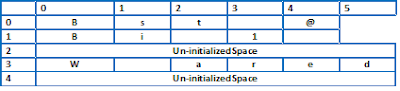
At this point, the array will look like the graphic below. 

There are two things to notice in this image.

  1. The size of strings contained by an array of strings is not the same. The length of strings can be variable.
  2. It is possible to leave un-initialized space at any slot of a multi-dimensional array in C/C++ programs. There will be software security implications but that's not beyond the scope of our piece.

It is a programmer's responsibility to free the memory acquired using this technique. Missing such things creates memory leaks which cause performance decreases, security-related problems, and an all-out crash sometimes. Debugging subtle semantic errors like these is often a programmer's worst nightmare.

Modern virtual machine-based programming languages such as Java and C# solve memory allocation and cleanup problems on behalf of the programmers. Of course, there is a performance penalty associated when the JVM or CLR is managing the memory on your behalf. But, such programs are way safer than bare-bones C/C++ programs where you have to do the memory allocation & cleanup yourself. But there still are problems that must be solved using unmanaged C/C++ code; one example is fighter jet software. Lockheed Martin recently won an F-35 software upgrade bid worth $1.8 Billion. I believe this software upgrade must be done in assembly, C, C++, or another language.

Freeing memory of char * and char**

Deleting the main array will suffice to free the memory consumed by double pointers. In our case, we'll do the following:

delete [] greenLandMD;

The C programming language uses malloc and memfree for allocating and freeing up memory. There was another method, memset, which was used to clean up memory allocated to a program. But that's beyond the scope of this article. 

I think this is enough on this topic; please feel free to comment on this post if you want to learn more.

As of 2024, this coding example/tutorial is still valid and useful. I've read somewhere that Rust programming language is going to take the place of C and C++ in the future. We'll see when that happens.  
More than 65% discount on my online courses can be availed now by clicking the links below: 


Friday, January 15, 2010

Path to Microsoft Certification for programmers

Path-To-Microsoft-Certification-MCTS
In university days I once tried to follow path to Sun Java Certified Programmer. On their web site I found very nice flow charts. For Microsoft's certification I could not find anything of this sort therefore I decided to collect data from Microsoft's web and create my own Microsoft Certification Tree diagram.


Everything seems to be starting from Exam 70-536: TS: Microsoft .Net Framework, Application Development Foundation. We will get MCTS after passing two exams, and MCPD after passing third exam of next stage.
Update: Everything still starts from Exam 70-536.

History of vendor certifications

Once upon a time these certification were the thing of the day. Small institutes would show sweet dreams to jobless young people and tell them that an MCSE can get them a job, or a visa to the USA.
The certifications became pretty useless with the introduction and popularity of dums, people would just spend a couple days learning the dumps by rote and pass certification exams with excellent score.

The certifications were not made to withstand such abuse(but Indians you know rape anything feminine they come across, or at least they try to). Various international bodies shut their certification and examination tracks in many countries. Comptia A+ for example, was a hardware professional certification which was sacked despite its popularity from many developing countries.

Certifications are totally useless?

The short answer is No. If someone prepares well for a certification and studies well; passing a certification will result in significant increase in knowledge about specific technology(ies).
There are still several great certifications out there by top companies like Cisco, Microsoft, Oracle, Zend.
Technology certifications are not an alternative to proper bachelors degree, they augment your graduate studies instead. Just like FCPS is not an alternative to MBBS, it is an additional qualification that makes medical professionals better in their job.

Tuesday, June 9, 2009

std::ostringstream AKA String Streams...

Want to share a few bits about a very important and useful feature of standard library today. std::ostringstream can come in handy in many situation. You know we often need to concatenate strings. And often it becomes tedious, usually this is done using strcat funtion in C and + operator in C++  std::string class . For example

// C style

char * szFullName = strcat("First Name ", " Last Name");


//C++ style
std::string strFirstName = "First Name";
std::string strLastName = "Last Name";
std::string strFullName = strFirstName + " " + strLastName;

std::ostringstream gives us a convenient way to build strings conveniently.
std::ostringstream provides functionality very much similar to sprintf function of C language.

Like for example you got names, ages, and heights of a few kids stored in arrays and you want them to be printed nicely on screen. Perhaps you could use a std::string and + operator to join string but I think using ostringstream will be a better approach.

Preview (hint: you can copy and paste the preview into Microsoft Word):
const int CONST_ARRAY_SIZE = 3;
std::string aryStrNames[CONST_ARRAY_SIZE] = {"Ali", "Jason", "Shiv"};
int aryNAges[CONST_ARRAY_SIZE] = {5,9,11};
float aryFHeight[CONST_ARRAY_SIZE]={3.2,4.0,4.4};
std::ostringstream outBuffer;
for(int i = 0; i < CONST_ARRAY_SIZE; i++){
outBuffer<<aryStrNames[i]<" is " << aryNAges[i] << " years old, and his height is "<< aryFHeight[i] << endl;
}// end for i
cout<< outBuffer.str();

Here's a link to ostringstream on C Plus Plushttp://www.cplusplus.com/reference/iostream/ostringstream/