Saturday, March 7, 2020

How to Change WinAppDriver Port Number?


The WinAppDriver, popularly known as Windows Application Driver is a UI automation engine that listens for incoming requests on port number 4782 by default.

Appium WinAppDriver UI Automation Testing Windows Apps in C#


You can see what port the WinAppDriver is listening to at any given moment when it is running; the port number is shown on the console.

WinAppDriver default port

But other than that, if you want to run the WinAppDriver on a different port number than the default, you can specify the port number in the command line arguments.
An example will be:

WinAppDriver.exe 28399

A screenshot is given below FYI.

Windows Application Driver (WAD) WinAppDriver.Exe Port Number Parameter cmd
WinAppDriver.exe port number in command line

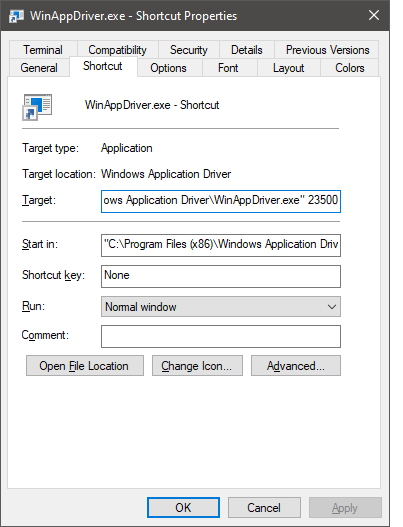
How to specify a different port number in the shortcut?

If you've created a shortcut to WinAppDriver.exe on your desktop, you can easily go and add the port number after the exe file path in the Target field.
An example screenshot is given below to show how to set a different Windows Application Driver (WAD) port number for the desktop shortcut:


Windows Application Driver (WAD) WinAppDriver.Exe Port Number Parameter in desktop shortcut
WinAppDriver Shortcut Port Number Change
Suppose you're using Azure DevOps and want to run the WinAppDriver on your self-hosted agent or Azure VM but with a different port number. You can specify this in the pipeline task parameters. The screenshot of the setting of the Azure DevOps pipeline WinAppDriver task is shown below. as an example

WinAppDriver Azure DevOps Pipeline Task Settings Command line arguments to change port number in UI Automation Testing
WinAppDriver Azure DevOps Pipeline Task Settings

Sunday, February 16, 2020

Disadvantages of automated functional testing


Disadvantages of Automated Functional Testing

  1. The machine used for running scripts gets occupied until the test automation activity is finished(true for Selenium, Appium, WinAppDriver, and CodedUI). 
  2. Small mistakes at the wrong time can fail your automated testing scripts. For example, hitting the enter key while UI automated testing is in progress might cause an unwanted popup or a form to submit, which could lead to a test failure.
  3. Automated black box testing (a.k.a functional UI testing) is slow. (true for Selenium, Appium, WinAppDriver, and CodedUI)
  4. Many resources are needed to run multiple tests in parallel(although it might not be possible to run specific tests in parallel due to application domain requirements).
  5. You can't pinpoint the cause of the fault, you only get to know the steps to reproduce, and the developers have to find the root cause of the bug later.
  6. Automated functional tests are flaky and fail due to small changes in the application UI. 

Automation testing is the buzzword of the day. But we must know that some types of test automation are less valuable than some other types of automated testing. 

Not all automated tests are created equal.

UI-driven testing, known as end-to-end or functional testing, is, on the surface, the easiest to get going. As a result, tools like Selenium, Appium, Coded UI, WinAppDriver, WebDriver.IO, and PostMan are in high demand. But there are still some disadvantages of automated UI testing, briefly summarized here for you. 


The best thing you can do is to automate unit testing and then integration testing. That's where you're going to get the most coverage. 


Saturday, January 11, 2020

Software testing and automated testing tools


Software testing is a quality control activity. It is considered to be a repetitive and labor-intensive task.
Computers in general are you know capable of doing such repetitive, boring, and labor-intensive tasks really well.
Appium WinAppDriver: Automated UI Testing Windows Apps in C#
Learn more about automated testing of Windows applications by clicking the link below.
https://www.udemy.com/course/appium-winappdriver-automation-testing/?referralCode=ED22C3A4CE5BB5E22E53

This leads us to software test automation and automated testing tools.
Software Test Automation tools help us to delegate laborious;  repetitive tasks to the computers, because that’s what computers do best.
Making the machines do the software testing job frees up time for Homosepians!, allowing them to be creative; something the machines can’t do well. At least at the time when this course was being created.
Automated software tests can be broadly broken into two categories.

  • Automated white box testing, such as 
    • Unit tests
    • Integration tests
    • API tests(Postman is a popular API testing tool)
  • Automated black box testing which includes
    • Automated UI testing(Robot Process Automation, RPA is a relevant field)

Test automation can be divided in two major phases…

First is “Creating scripts intended to exercise various parts of the software system under test and assert the results shown by the System Under Test or SUT.”

The second is “Running the test scripts to exercise the system and display the results.”
Any programming language can be used to write these scripts. For example, we will use C# .Net and Java.
Once the test scripts are in place, proper tools are also available to run the scripts.
Tests are commonly executed by test run agents.
For Visual Studio Unit Testing Framework, these are called agents. For UIPath, these are called robots.


In general, when we run test scripts, they either pass or fail based on the response of the system under test.

We can see these reports to assess the correctness of the system in a “quantitative fashion.”
UI Path Orchestrator
A developer can run these tests on one machine or on many machines using test control systems like Microsoft TFS or UiPath Orchestrator.

Jenkins is another such tool popular in the Java community.
Several types of automated testing tools are available in the market
These tools facilitate the process of writing and running test scripts
These tools also commonly include utility software to record user actions and prepare test scripts based on those actions
Some popular test automation (and RPA) tools are

Selenium and rarely used Selenium Recorder.
Appium for iOS and Android automated testing
UiPath
Appium-based WinAppDriver for testing Windows applications
I hope you found this video to be useful. Please like it and share it with your QA friends.
Do subscribe to my channel as well.

Monday, December 30, 2019

Discount on Udemy Courses!


Appium WinAppDriver: Automated UI Testing Windows Apps in C# 


Windows Service Programming, Debugging, Installing in C#.Net

UDP Socket Programming For Distributed Computing in C#.Net (hightest rated course)

https://www.udemy.com/course/udpsocketprogramming/?couponCode=BESTJULY2020

TCP/IP Socket Programming in C# .Net For Coders & Students (best selling course)

These coupons will stay alive only for five days, created as a new year's gift for everyone out there. Enroll in any of my C# .Net Udemy courses for as little as $9.99.
Hurry up, the discount will run out soon.


Hi, 

I hope you’re doing great. All of my courses are now available at the discount price of $9.99 each. Its a limited time offer, please click the links below enrol now. 

Appium WinAppDriver UI Automation Testing Windows Apps in C#(only dedicated course about WinAppDriver on Udemy in a post-CodedUI world)
TCP/IP Socket Programming in C# .Net For Coders & Students(best seller)
UDP Socket Programming For Distributed Computing in C#.Net(highly rated)
Windows Service Programming, Debugging, Installing in C#.Net

Best regards,

Naeem Malik.


Friday, October 11, 2019

What is software testing, software test automation, and functional software testing


Software test automation in Appium WinAppDriver and C# .Net

Software testing is the process of using an application according to a test plan to find defects in the application under test.

Automated testing is the discipline that uses various tools to make the machines perform software testing for us with little to no human intervention.

Automated functional testing is one of many types of automated testing.

Functional Testing:
Functional testing is performed through the user interface of an application
A tester performs various operations on the application under test according to certain test cases.
The test cases can be categorized concerning their scope.

Smoke Testing:
Smoke tests are the set of test cases that ensures the application’s basic functionality is intact.
The term originates in the electronics industry, where an appliance is turned on after manufacturing just to ensure it does not burn or give smoke.

Regression Testing: 
Another important classification of test cases is called regression tests,
Regression tests ensure that functionality that was working in the past has not stopped after some application changes.

When to run smoke tests and regression tests?

Smoke tests and regression tests are commonly executed on production systems after changes like

  1. Hardware updates
  2. Firewall (or load balancer)updates
  3. Operating System updates 
  4. General software updates


Common causes of automation testing
The aforementioned reasons mean the testers must perform smoke and regression tests repeatedly after application or system updates.
It is a boring and labor-intensive task. The agony is amplified when the testers have to take screenshots for auditing purposes.
Many such system updates are done during the holidays; the testers have to come and do all testing over the holidays, which adds injury to the insult.

These causes make functional testing a prime candidate for test automation.
For example, my current job(an insurance company) has forty business-critical applications. In the past, about 20 people had to come to the office for testing when a patch was deployed.
But now, all of the work is automated, and only one or two persons come and run all the scripts.

Automated functional testing is performed using various test automation tools
The most powerful way to automate testing is by writing code to perform repeating tasks on the application UI for you.

These scripts also make sure that the application under test is showing the correct expected results
Popular test automation tools also produce test pass/fail reports to give an overview of system health.
Once these scripts are in place, it is possible to configure them with various continuous integration systems such that they can execute the scripts with little or no human intervention
The point to be noted here is that applications under development are unsuitable for automated functional testing.
When an application is under development, it is optimal for testing with other types of automation such as unit testing and integration testing.
A large number of business-critical Windows applications are already deployed across the enterprise world right now
To keep the core business running, these applications must be tested after every system or application update by manual testers.

These applications are the prime candidates for functional test automation
In this course, I will show you how to create test scripts for testing various types of Windows applications such as Win32, WinForms, WPF, and UWP using Microsoft’s next-generation test automation technologies WinAppDriver.

I've launched a course about Automated UI Testing using WinAppDriver with C# .Net; here's a best price discount coupon that will last only 5 days.
https://www.udemy.com/course/appium-winappdriver-automation-testing/?couponCode=0B4AAB139DEA09114D95

After the discount has expired, you may get the course here:
https://www.udemy.com/course/appium-winappdriver-automation-testing/?referralCode=ED22C3A4CE5BB5E22E53