Sunday, September 26, 2010

Saturday, September 25, 2010
Char** Array of Strings in C and C Plus Plus(C++)
The C++ source code shown below is an example of char**, also known as a character double pointer, which is used for managing two-dimensional arrays of string variables.
Keep reading to learn more & see detailed examples.
char** greenLandMD;
greenLandMD = new char*[5];// initialize the double pointer
greenLandMD[0]=new char[4];// initialize 1st char*, with capacity of 4 chars
greenLandMD[1]=new char[5];// initialize 2nd char*, with capacity of 5 chars

strcpy(greenLandMD[0],"Bst @");//copy some data to 1st string
strcpy(greenLandMD[1],"Bi! 1");//copy some data to 2nd string
greenLandMD[3]="W ared";// an alternate way of copying data

// print and see the data
cout<<greenLandMD[0]<<endl<<greenLandMD[1]<<endl<<greenLandMD[3]<<endl;
Defining strings in C and C++:
A string is an array of characters (char) data type variables in C and C++ programming languages. For example, an array of characters is defined as follows:
char myString[50];
Note: Do check my C# online programming courses with a discount below
Best-selling Udemy course
It is possible to define a character array and initialize it on the fly with the code below. That's how we can doll two birds with one stone!
char myInitializedString[50]={"I am invincible..."};

An alternate technique of defining C-style character arrays with the help of char pointers can be used as well(char* stands for character pointer), which is demonstrated below:
char* myInitializedCharPtr = "Here we go again";
What if someone wants to store multiple strings in an array? It's called an array of strings or a multi-dimensional array. Someone recently asked me how to keep numerous strings in an array in the C programming language? It is relatively simple to create and initialize an array of strings in your program.
char ArrayOfStringsInitialized[3][50] = {"Rock and Rolla","iToka","Thats it"};
This multi-dimensional array of strings contains 3 strings, each of length up to 50 characters.
To iterate the array we just created, do the following...
for(int n = 0; n<=2/*less than last element of array*/;n++)
{
        cout << ArrayOfStringsInitialized[n] << endl;
}
Notice that you got 50 characters allocated but used only 14 for "Rock and Rolla" so if you try to get the length of the string in this case it will be 14, the space occupied by the characters of the strings you just stored in the array. It won't be 50 because the string termination character \0 would've been found much earlier.
Dynamic two-dimensional (2D) array:
If you want to create a multi-dimensional array on run time, using pointer types. You will need a char double pointer or char**. The two stars stand for a double pointer, and it will make your C++ programming language code look something like the example given below:
char** greenLandMD;
greenLandMD = new char*[5];// initialize the double pointer
greenLandMD[0]=new char[4];// initialize 1st char*, with capacity of 4 chars
greenLandMD[1]=new char[5];// initialize 2nd char*, with capacity of 5 chars

strcpy(greenLandMD[0],"Bst @");//copy some data to 1st string
strcpy(greenLandMD[1],"Bi! 1");//copy some data to 2nd string
greenLandMD[3]="W ared";// an alternate way of copying data

// print and see the data
cout<<greenLandMD[0]<<endl<<greenLandMD[1]<<endl<<greenLandMD[3]<<endl;
When you run your C++ program, the console will show output as follows:
| c:\>Bst @ Bi! 1 W are |
The example source code below shows an alternate way to achieve the same result in C++.
cout<<*(greenLandMD+3)<<endl;
At this point, the array will look like the graphic below.
cout<<*(greenLandMD+0)<<endl;
cout<<*(greenLandMD+1)<<endl;
At this point, the array will look like the graphic below.
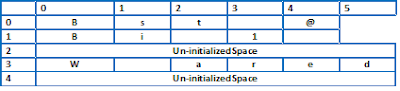 |
- The size of strings contained by an array of strings is not the same. The length of strings can be variable.
- It is possible to leave un-initialized space at any slot of a multi-dimensional array in C/C++ programs. There will be software security implications but that's not beyond the scope of our piece.
Modern virtual machine-based programming languages such as Java and C# solve memory allocation and cleanup problems on behalf of the programmers. Of course, there is a performance penalty associated when the JVM or CLR is managing the memory on your behalf. But, such programs are way safer than bare-bones C/C++ programs where you have to do the memory allocation & cleanup yourself. But there still are problems that must be solved using unmanaged C/C++ code; one example is fighter jet software. Lockheed Martin recently won an F-35 software upgrade bid worth $1.8 Billion. I believe this software upgrade must be done in assembly, C, C++, or another language.
Freeing memory of char * and char**
Deleting the main array will suffice to free the memory consumed by double pointers. In our case, we'll do the following:delete [] greenLandMD;
The C programming language uses malloc and memfree for allocating and freeing up memory. There was another method, memset, which was used to clean up memory allocated to a program. But that's beyond the scope of this article.
I think this is enough on this topic; please feel free to comment on this post if you want to learn more.
As of 2024, this coding example/tutorial is still valid and useful. I've read somewhere that Rust programming language is going to take the place of C and C++ in the future. We'll see when that happens.
More than 65% discount on my online courses can be availed now by clicking the links below:
Friday, January 15, 2010
Path to Microsoft Certification for programmers

In university days I once tried to follow path to Sun Java Certified Programmer. On their web site I found very nice flow charts. For Microsoft's certification I could not find anything of this sort therefore I decided to collect data from Microsoft's web and create my own Microsoft Certification Tree diagram.
Everything seems to be starting from Exam 70-536: TS: Microsoft .Net Framework, Application Development Foundation. We will get MCTS after passing two exams, and MCPD after passing third exam of next stage.
Update: Everything still starts from Exam 70-536. Everything seems to be starting from Exam 70-536: TS: Microsoft .Net Framework, Application Development Foundation. We will get MCTS after passing two exams, and MCPD after passing third exam of next stage.
History of vendor certifications
Once upon a time these certification were the thing of the day. Small institutes would show sweet dreams to jobless young people and tell them that an MCSE can get them a job, or a visa to the USA.The certifications became pretty useless with the introduction and popularity of dums, people would just spend a couple days learning the dumps by rote and pass certification exams with excellent score.
The certifications were not made to withstand such abuse(but Indians you know rape anything feminine they come across, or at least they try to). Various international bodies shut their certification and examination tracks in many countries. Comptia A+ for example, was a hardware professional certification which was sacked despite its popularity from many developing countries.
Certifications are totally useless?
The short answer is No. If someone prepares well for a certification and studies well; passing a certification will result in significant increase in knowledge about specific technology(ies).
There are still several great certifications out there by top companies like Cisco, Microsoft, Oracle, Zend.
Technology certifications are not an alternative to proper bachelors degree, they augment your graduate studies instead. Just like FCPS is not an alternative to MBBS, it is an additional qualification that makes medical professionals better in their job.
Tuesday, June 9, 2009
std::ostringstream AKA String Streams...
Want to share a few bits about a very important and useful feature of standard library today. std::ostringstream can come in handy in many situation. You know we often need to concatenate strings. And often it becomes tedious, usually this is done using strcat funtion in C and + operator in C++ std::string class . For example
// C style
char * szFullName = strcat("First Name ", " Last Name");
//C++ style
std::ostringstream gives us a convenient way to build strings conveniently.
std::ostringstream provides functionality very much similar to sprintf function of C language.
Like for example you got names, ages, and heights of a few kids stored in arrays and you want them to be printed nicely on screen. Perhaps you could use a std::string and + operator to join string but I think using ostringstream will be a better approach.
Preview (hint: you can copy and paste the preview into Microsoft Word):
Here's a link to ostringstream on C Plus Plushttp://www.cplusplus.com/reference/iostream/ostringstream/
// C style
char * szFullName = strcat("First Name ", " Last Name");
//C++ style
std::string strFirstName = "First Name";
std::string strLastName = "Last Name";
std::string strFullName = strFirstName + " " + strLastName;
std::ostringstream gives us a convenient way to build strings conveniently.
std::ostringstream provides functionality very much similar to sprintf function of C language.
Like for example you got names, ages, and heights of a few kids stored in arrays and you want them to be printed nicely on screen. Perhaps you could use a std::string and + operator to join string but I think using ostringstream will be a better approach.
Preview (hint: you can copy and paste the preview into Microsoft Word):
const int CONST_ARRAY_SIZE = 3;
std::string aryStrNames[CONST_ARRAY_SIZE] = {"Ali", "Jason", "Shiv"};
int aryNAges[CONST_ARRAY_SIZE] = {5,9,11};
float aryFHeight[CONST_ARRAY_SIZE]={3.2,4.0,4.4};
std::ostringstream outBuffer;
for(int i = 0; i < CONST_ARRAY_SIZE; i++){
outBuffer<<aryStrNames[i]<" is " << aryNAges[i] << " years old, and his height is "<< aryFHeight[i] << endl;
}// end for i
cout<< outBuffer.str();
Here's a link to ostringstream on C Plus Plushttp://www.cplusplus.com/reference/iostream/ostringstream/
Tuesday, March 17, 2009
Working with std::string::substring() method
Though it is a very simple function, but sometimes people(me too) make a mistake when coding thing up. For example we have a std::string strHello
 int nPositoinOfSemiColon = strHello.find(";", 0);
find method will find the fist parameter ";" in strHello, starting from second parameter i.e. 0.
Now the nPositoinOfSemiColon will contain either string::npos which means the string provided to find method was not found in strHello. Or in our case, 5 which is the location of ";".
strHello.substr(0, nPositoinOfSemiColon );
will return "Hello", i.e. 5 characters starting from location 0 in strHello.
Now consider
int nPositionOfSecondSemiColon = strHello.find(";", nPositionOfSemiColon);
Well... writing following line of code will... wonder what...
strHello.substr(nPositionOfSemiColon, nPositionOfSecondSemiColon);
CAUSE AN ERROR!!! FOLKS!!! ERR GRR ERROOORRR... a vicious cruel ugly error... heh heh heh...
Poor baby programmers will asK "But why Uncle why???"
Because, of the values in variables at this time are...
nPositionOfSemiColon = 5
AND
nPositionOfSecondSemiColon = 11
That means
strHello.substr(5, 11);
i.e. extract 11 characters starting from location 5 in strHello.
Whereas, 11 is total length of strHello...
The right way to go is
strHello.substr(nPositionOfSemiColon,
nPositionOfSecondSemiColon - nPositionOfSemiColon);
That means
strHello.substr(5, 6); // That means ";WORLD"
Cheers folks... have fun... remember... coding is a noble pursuit... so just keep hitting it hard... savor the wonders and joys of turning real world into programming language codes, and bear the tensions with enough tolerance...
 int nPositoinOfSemiColon = strHello.find(";", 0);
find method will find the fist parameter ";" in strHello, starting from second parameter i.e. 0.
Now the nPositoinOfSemiColon will contain either string::npos which means the string provided to find method was not found in strHello. Or in our case, 5 which is the location of ";".
strHello.substr(0, nPositoinOfSemiColon );
will return "Hello", i.e. 5 characters starting from location 0 in strHello.
Now consider
int nPositionOfSecondSemiColon = strHello.find(";", nPositionOfSemiColon);
Well... writing following line of code will... wonder what...
strHello.substr(nPositionOfSemiColon, nPositionOfSecondSemiColon);
CAUSE AN ERROR!!! FOLKS!!! ERR GRR ERROOORRR... a vicious cruel ugly error... heh heh heh...
Poor baby programmers will asK "But why Uncle why???"
Because, of the values in variables at this time are...
nPositionOfSemiColon = 5
AND
nPositionOfSecondSemiColon = 11
That means
strHello.substr(5, 11);
i.e. extract 11 characters starting from location 5 in strHello.
Whereas, 11 is total length of strHello...
The right way to go is
strHello.substr(nPositionOfSemiColon,
nPositionOfSecondSemiColon - nPositionOfSemiColon);
That means
strHello.substr(5, 6); // That means ";WORLD"
Cheers folks... have fun... remember... coding is a noble pursuit... so just keep hitting it hard... savor the wonders and joys of turning real world into programming language codes, and bear the tensions with enough tolerance...
Subscribe to:
Posts (Atom)