Sunday, August 18, 2019

Software testing and it's relationship with automated testing tools

Software testing is a quality control activity
It is considered to be a repetitive and labor intensive task
Computers in general are you know capable of doing such repetitive, boring, and labor intensive tasks really well.

This is where the test automation tools(Selenium, Appium, WinAppDriver)  come into play.
Test automation tools help us to delegate the labour intensive;  repetitive software testing tasks to the computers, because that’s what the machines do the best.
Making the cyborgs do the boring software testing job frees up time for  Homosepians!, allowing them to be creative; something the machines can’t do well. At least at the time when this course was being created.

Test automation can be divided in two major sections…

  1. “Creating scripts intended to exercise various parts of the software system under test and assert the results shown by the System Under Test or SUT.”
  2. “Running the test scripts to actually exercise the system and display the results.”


Any programming language can be used to write these scripts including but not limited to C# .Net, Java, or Python.

Once the test automation scripts are in place, proper tools are available to run the scripts as well. The job of a test automation engineer doesn't end once the scripts are written. Test engineers are needed maintain the tests in case the application under test is changed.

In general; when we run test scripts they either pass or fail based on the response of system under test. The tests might fail if the test scripts have a bug. Such things can raise a false flag that you've found a defect.

Reports generated by a test run are a work product of automated testing. We can see these reports to assess the correctness of the system in a “quantitative fashion”

Several types of automated testing tools are available in the market

These tools facilitate the process of writing and running test scripts
These tools also commonly include utility software to record user actions and prepare test scripts based on those actions
I will provide you the essential knowledge of the tools related to WinAppDriver and Visual Studio for testing Windows applications and the basic concepts to get you started in the right direction.
The reason for sticking with the basics is that a single course won’t be sufficient to cover all available types of automated testing tools

Monday, July 29, 2019

How to download and run WinAppDriver UI Recorder


Appium WinAppDriver: Automated UI Testing Windows Apps in C#


WinAppDriver UI Recorder is Microsoft's lightweight UI element/object inspector/spy. It is a free product.

Looking for a WinAppDriver tutorial? Check my course on Udemy. It is better than WinAppDriver documentation!

https://www.udemy.com/course/appium-winappdriver-automation-testing/?referralCode=ED22C3A4CE5BB5E22E53

WAD UIR(Windows Application Driver UI Recorder) is a part of the WinAppDriver(Windows Application Driver) project, but it can function independently without the WinAppDriver. I find it more accurate, useful, and a better choice than the traditional Windows UI inspector.

WinAppDriver UI Recorder is also known as WAD UIRecorder. After WinAppDriver UI Recorder download, you can use it to identify various UI elements of Windows applications. 

This tutorial will show you how to download and run WinAppDriver UI Recorder with screenshots.

Pre-requisites of Windows Application Driver (WAD) UI Recorder

You don't need to install the WAD UI Recorder. Just download a small zip package, unzip it, and start using it through the .exe file.

You might copy the WinAppDriver UI Recorder folder from one machine to another to run it. You can simply go for WinAppDriver UI Recorder download and use it. 

The WinAppDriverUIRecorder runs only on Windows 10.

You don't need to have Windows 10 Developer Mode turned on to run the WinAppDriver UI Recorder or object spy. This makes it very suitable for day-to-day object inspection on all sorts of  Windows application UI Automation needs on Windows PCs, for test automation or otherwise.

How to download WinAppDriver UI Recorder

Here's the direct download link:

Got to the WinAppDriver GitHub repository by following this link: https://github.com/Microsoft/WinAppDriver

Click on the + {number} release link. 

  1.  
Various versions of WinAppDriver UI Recorder are available for download on this page. Please note that WinAppDriver download items are also available on the same page. 
  1. Right now, I am using "WinAppDriver UI Recorder v1.0 RC". The WinAppDriver UI Recorder version 1.1 RC  has a bug(apparently), and it didn't work on the two machines where I downloaded it. 
  2. WinAppDriver for Windows 10 and windows 11 can be done from the same page.
  3. Click on the "Assets" arrow underneath the release. 
  4. A set of file links will be present on the page, as shown in the screenshot below. 

  5. Click on the link titled "WinAppDriverUIRecorder.zip". 
  6. Unzip the zip file and go inside the newly created "WinAppDriverUIRecorder" folder when the zip file is finished downloading. 
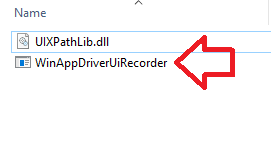
  7. This folder will contain only two files, a file named "WinAppDriverUiRecorder.exe" and another named "UIXPathLib.dll."
  8. To find UI control properties and inspect objects, run the exe file named WinAppDriverUiRecorder.exe file. It is an object spy. 
  9. The file is shown in the screenshot below. There is no specific icon for WinAppDriver UI Recorder file. Although I suppose there has to be one. It deserves to have an icon for itself. 
  10. Double-click the "WinAppDriverUiRecordre.exe" icon to launch it. 
  11. Once launched, the WinAppDriver UI Recorder window will be shown on the screen. A screenshot is given below, FYI. This can be a very helpful tool for automated functional testing because it lets you easily inspect UI objects on a Windows PC and see important information about UI controls. 
  12. Once the UI Recorder is open, it will automatically highlight the UI element under the mouse cursor and show the properties of the highlighted control. 
  13. You might use these properties in UI automation or automated functional testing of Windows applications, especially the enterprise PC applications, which are still widely used inside offices. 
  14. As a sample, I've opened the Windows Calculator application and the WAD UI Recorder side by side. You can see that the number 9 key is highlighted in the calculator, and various properties of these UI elements are shown in the WindowsAppDriver UI Recorder screen. 
You can now use WinAppDriver for windows application automation with confidence. Here is the WinAppDriver tutorial for you(link). 
Please note that WAD UI Recorder provides a full XPath of Windows controls. This makes automated test script writing very easy.

I hope you found this article to be helpful. Please share it on your social media if you think it is useful. 
WinAppDriver for windows application test automation is the best choice. 
You must be careful that the UI element control properties found by the WADUIR are often more helpful. If you find control properties using inspect.exe, they might not be valid with a WAD script. 
If you're looking forward to WinAppDriver Java test automation, you can utilize the examples in the documentation section.

Saturday, June 22, 2019

WinApp Driver vs Coded UI - Windows Test Automation Tools Comparison


Old fans of test tools may ask: is Coded UI dead, and is WinAppDriver the way to go now? Yes on both. Below you get a quick table that lays out how they stack up, side by side, so you can pick the right path for your next test job. This page also works as a plain WinAppDriver guide for folks new to Windows app test work, plus tips on C#, Java, and Python test code, and a coupon code for my course near the end.
Serial
Coded UI
WinAppDriver
1
Coded UI is a Closed source project
Windows Application Driver is a partially Open source project
2
Coded UI is Not hosted on GitHub
WinAppDriver has a repository on GitHub
3
Coded UI is very expensive, it has a hefty license fee, licensed product
[Appium based] WinAppDriver is free software, there's no licensing fee at all
4
Microsoft Coded UI does not follow an industry standard
WinAppDriver is based on WebDriver industry standard(https://www.w3.org/TR/webdriver/)
5
Coded UI is Based on Microsoft’s closed source technologies
WinAppDriver is Based on Appium, WebDriver, and Selenium industry standard open source technologies.
6
Limited to only Microsoft’s chosen programming languages
WinAppDriver Can be extended to support any programming language(C#, Python, Java, C++, you name it). Many APIs already available. If you learn it with one programming language, you can easily take the same ideas to another language.
7
Coded UI uses a proprietary protocol for communicating with the machines running automation. Remote machines are not supported.
Being based on Appium, WinAppDriver uses JSON wire protocol for communication between an instance of WinAppDriver and test automation scripts. You can also create a grid if need be.
8
Knowing CodedUI won’t land you many jobs in future
Knowing Appium based WinAppDriver makes you suitable for Selenium & Appium mobile automation job. You can switch over to mobile testing with little effort.
9
Supports older versions of Windows OS i.e. Windows 7
Does not support older versions of Windows(works on Windows 10, Windows Server 2016 and above)
10
Almost dead community, not much going on with Coded UI
The community of WinAppDriver is very active online on GitHub.
11
Deprecated, no further enhancements in Coded UI
WinAppDriver is actively in development, continuously improving. Microsoft is pouring resources into it.
12
Coded UI script (C#, VB.Net) runs on a machine directly
A script based on WinAppDriver can control multiple machines using driver instances without even going to the machines under control.
13
Coded UI leans on a point and click tool tied to Visual Studio, with a steep climb past basic steps.
WinAppDriver uses plain code from day one. Once you know it, the same idea moves to Java, Python, or C#.
What was Coded UI: Coded UI was a paid tool from Microsoft for UI test work. It let you record and play back clicks in Visual Studio. Microsoft killed it off in 2019, and it gets no new fixes or fresh code.
What is WinAppDriver: WinAppDriver is a free tool from Microsoft for Windows app test work. It sits on top of Appium, so it talks the same open, wide-used WebDriver tongue as web and phone tests. WinAppDriver is not open source on its own, but it taps into open tools all the way down.


Udemy Course: Playwright TypeScript Automation Testing


I run a full course on WinAppDriver test work with C# .Net. It goes from zero all the way to real, live test runs on real apps. Use code CBP2026AU to save on the price.

https://www.udemy.com/course/appium-winappdriver-automation-testing/?couponCode=CBP2026AU

Azure DevOps Build Pipelines: Run Windows UI Automation & CI


This course is a start guide for test work with real code. It also works as a WinAppDriver guide and a place to learn from. Coded UI is dead now, and WinAppDriver is the way to go from here.
You may think WinAppDriver only works on Windows 10, so you stay on Windows 7. That is wrong. Microsoft ended help for Windows 7 back in 2020.

FYI, you can see key gaps, Coded UI vs WinAppDriver, in the list above.

Also, one Coded UI test runs on one box only. But one WinAppDriver script can run tests on more than one box at once. This helps a lot for client-server test setups.

Appium WinAppDriver Console Window Showing JSON Commands

Note that my course works well as a top WinAppDriver guide. You can use it to learn Windows desk app test work, then take the same ideas to Java or Python too.

Few folks look at desk app test work these days. Most think the desk app is dead. But desk app setups still run the core of many big firms. One such case is ResWare Desktop.
How to test ResWare Desktop?
You can test ResWare with WinAppDriver. See the link below for my top WinAppDriver guide, plus a coupon code to save on it.


Quick FAQ

Is Coded UI dead?
Yes. Coded UI is dead and gone. Microsoft killed it off back in 2019. WinAppDriver is what you should learn now.

Does WinAppDriver cost money?
No. It is free to use. There is no fee at all, unlike Coded UI, which had a big price tag.

Can I learn WinAppDriver with Java or Python, not just C#?
Yes. WinAppDriver is not tied to one code base. You can drive it from C#, Java, Python, or almost any code base you like.

Where do I learn WinAppDriver from zero?
Start with my course below. It walks you from zero up to real test runs, with a coupon code to save on the price: Windows Desktop Applications Test Automation in WinAppDriver (code CBP2026AU).

Monday, May 20, 2019

Online Course Introduction: TCP/IP Socket Programming in C#.Net For Coders & Students


Learn socket programming in C# .Net
Big discount coupon link
https://www.udemy.com/tcpip-socket-programming-for-coders-using-csharp-net/?couponCode=HALF
Get proficient in computer network socket programming using TCP/IP streaming sockets and become a better professional programmer.


An important concept of socket programming & network communication is covered in every video lecture. Concise C# code examples are supplied in Visual Studio solution form, and a demo after every couple of lectures will show you practical implementation of the concepts described earlier. 
          By the end of this course, you will be able to create CSharp .Net software capable of sending and receiving data over TCP/IP sockets on peer to peer basis with async and await keywords. You will learn not only socket programming, but async/await keywords as well. The course will make you a better programmer.

Why take this course? 
You should take this course if you're a professional(or student) with some coding experience in the past but lack understanding of how computer networks work on a software level(either in C#, Java, or C++). 
You will learn techniques which are useful in real life scenarios commonly faced by programmers. 
Many students of distributed application programming university courses have taken this course in the past and posted positive comments in reviews. They were able to easily complete their assignments on their own after watching this course.                        
Section 1 is available for free, it contains very useful information anybody can benefit from, whether they're familiar with C#.Net or not. 


Minimum upfront theory 
A lot of courses tend to pile up theory ahead of the real code, this course is going take a minimum theory first approach. 
You will learn essentials of network programming and start writing C# code in under 15 minutes. 

Use of Windows Forms and class library
This course will use a class library project in C# along with Win Forms, an approach different from many other courses who use command line projects. My teaching methodology makes the course lot less boring and non-classroom like, practically useful and really suitable for professionals. 
Short, sweet, to the point 
Entire course is designed with the busy professionals in mind and the videos were created to make your online learning experience fruitful and easy.  It is a project based training.
Asynchronous programming with async/await keywords, modern real world solution
async/await keywords were introduced in C# 5.0. In traditional socket programming scenarios, (multi) threading is use to create a responsive server or client. I have bypassed that route and shown you how to use asynchronous sockets directly. I first explain you what are async/await keywords and then I show how to use these for non-blocking network I/O. This part of the puzzle in the key to high traffic enterprise applications.
Reinforced learning 
Each section contains a quiz on the end which is very helpful to ensure that you review and retain important bits of information imparted in relevant course section.
Join an active community
Become a part of the programmers community who have already taken this course. Your questions will be answered by the fellow students and the course instructor as well. Really a wonderful place to start learning!
Learn something new
Sockets are considered an advanced topic, a danger zone in programming parlance. Knowing it means you take your trade seriously.
Object Oriented Programming
This course teaches you how to create a distributed application using the principles of OOP. You are going to bridge the gap between the back-end C#.Net class library and the fron-tend WinForms application using an implementation of Publisher/Subscriber model based on EventHandler classes. This course also shows you what are event handlers and how to create your own event.
Bonus 
You will also learn how to resolve a hostname to IP Address using System.Net.DNS class. You'll also implement various sanity checks using tryparse and try/catch. 
https://www.udemy.com/tcpip-socket-programming-for-coders-using-csharp-net/?couponCode=HALF

You don't need to learn C to work on this course.

Socket Java, python socket udp

Sunday, May 19, 2019

UDP Socket Programming For Distributed Computing in C#.Net


This course teaches UDP socket programming in C# .Net in a hands on and easy fashion. It is a carefully planned and crafted course which takes the student by the hand and teaches them how to create production quality distributed network applications using C# .Net in a step by step fashion.

The first sections of this course cover the basics of computer networks, and UDP socket programming in CSharp dot Net necessary for network and socket programming.
Next two sections will teach how to send and receive UDP broadcast in a command prompt C# .Net application using synchronous sockets with method calls such as Socket.Send and Socket.Receive. You will also learn how to convert between string and byte data types.

Once you're familiar with how distributed network applications function, the course takes you towards asynchronous socket programming. You will also learn about callbacks methods and how you can implement callbacks in C# .Net. I will also show you the publisher subscriber model AKA pub/sub model. We will implement pub/sub model in our library project and the client/server applications using the library as well. We'll create event handlers, delegates, and raise events as well.

We are going to use an Object Oriented approach for this course following the principles of OOP. In next section we're going to implement a publisher/subscriber model in C# .Net to bridge the gap between the API solution classes and the WinForms based front end.

Next, you will learn what is JSON (JavaScript Object Notation) and how you can add JSON functionality to your C# applications with Newtonsoft JSON.Net. We'll start implementing an application level communication protocol in this section.
In the next section, you'll learn how to transmit binary data over a UDP socket in C# .Net. As an example, I'm going to show you how to transfer png image files between multiple clients of your applications through the server. The JSON based protocol implemented in previous section is going to play a key role here.

After watching this course, you'll be able to write your own distributed applications that communicate through the network, either WiFi or Ethernet. You will have the foundation knowledge needed to create C# .Net based applications for IoT, computer telephony, VoIP, online gaming(e.g. Unity), and much more.

This course also shows you how to use String Interpolation which is a C# 6 feature. You'll also learn how to debug network applications in Visual Studio and how to write code faster.

Discounted coupon code link for the UDP socket programming in C# .Net course. 

You don't need to learn C to work on this course.

Socket Java, python socket udp